
A Driver represents an external or internal condition that motivates an organization to define its goals and implement the changes necessary to achieve them. Drivers may be internal; in which case they are usually associated with a Stakeholder. They may also be external, e.g., economic changes or changing legislation.
Driver List #
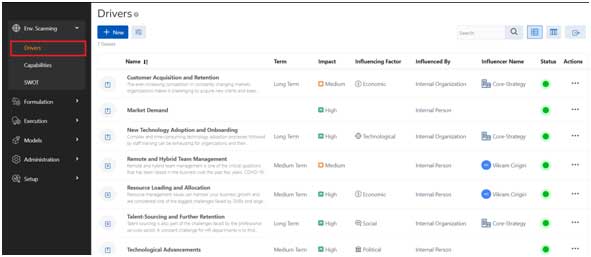
- Access the Drivers Page from the menu: Env. Scanning à Drivers
Common Features
All list pages will have the following capabilities:
 This button allows user to create a new driver.
 Open Filter section for advanced filter capability
 User has an ability to export results in XLSX, CSV, PDF formats
 View the Drivers List Page
 View the Drivers as a PESTLE Analysis view
Table Column
- Column 1: shows all icons to indicate features and properties of the driver.
- Name: The name of the driver and the description is provided.
- Term: Identifications of term of the drivers from Short/ Medium/ Long Term.
- Impact: The impact of the driver on the organization.
- Influencing Factor: Any driver is grouped by any one of Political, Economic, Social, Technological, Legal or environmental factors.
- Influenced By: Drivers are influenced by any one of Internal Organization/ User or External Organization/ User.
- Influencer Name: The name of the organization or user is mentioned here.
- Status: Shows the current status of the driver which is either Active/ Disabled.
- Actions: The actions column will have a quick action menu item as follows:
- View Driver: View Driver details
- Edit: Edit the driver details
- Delete: Any Individual Driver can be permanently deleted using this feature. Once deleted, no historical information will be available about the driver.
PESTLE Analysis #
PESTLE Analysis is a simple and widely used tool that helps you analyses the Political, Economic, Socio-Cultural, Technological, Legal and Environmental changes in your business environment. This help Core Strategy users to understand the “big picture” forces of change that you’re exposed to, and, from this, take advantage of the opportunities. Optionally PESTLE Analysis is configured during the entry of the Driver. Following section provides steps to navigate the PESTLE Analysis.

On the list Page, user can click on the PESTLE Analysis button to view the graphical view for analysis purposes.
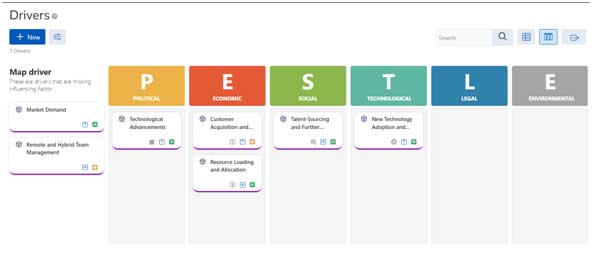
The PESTLE Analysis view provides a clear graphical view of the business environment. The Business Expert can do further grouping of drivers, if they are not properly mapped, as we are also providing Drag/ Drop capability within the screen.
Any previously un-mapped drivers are visible under the Map Driver section. User can drag the driver to an appropriate section.
Add Driver #

New Drivers can be added using the “New” button the top left of the screen.
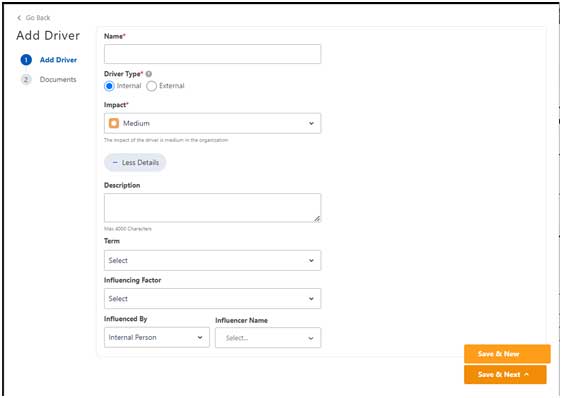
- Name (Mandatory): The Name of a driver
- Driver Type (Mandatory): Drivers are either Internal/ External.
- Impact (Mandatory): Identify the impact the current driver has on the organization.
- Description: Provide a description of the driver for a better understanding.
- Term: Identify the duration of impact the driver is likely going to have on the organization.
- Influencing Factor: Map the driver to any one of the influencing factors like Political, Economic, Social, Technological, Legal or environmental.
- Influenced By: Identify weather the driver is influenced either by Internal Organization/ Person or External Organization/ Person.
- Influencer Name: The name of the organization or person who has influenced the driver.
Buttons
- Save & Next: Save the current record and move to uploading a document for the same driver.
- Save & New: Save the current record and show a black screen to create new driver.
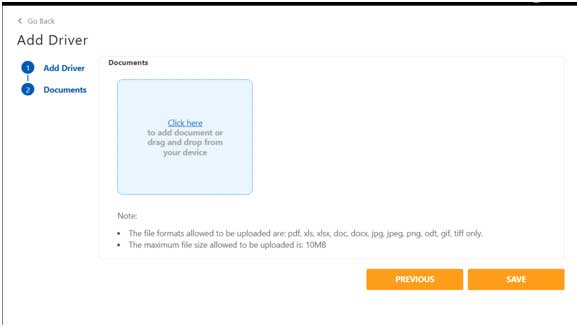
- For any driver, system provides an ability to upload multiple documents.
- The file formats allowed to be uploaded are: pdf, xls, xlsx, doc, docx, jpg, jpeg, png, odt, gif, tiff only.
- The maximum file size allowed to be uploaded is: 10MB
View Driver #
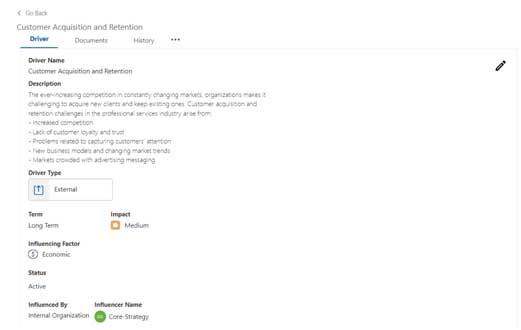
Edit Icon : User can choose to edit an individual driver by clicking on the Edit Icon
Driver Tab: The driver section provides the basic information about the driver which includes:
- Driver Name: The name of the driver
- Description: The brief description provided by the user
- Driver Type: Driver types can be either Internal/ External influencing factor for the organization.
- Term: Identify the duration of impact the driver is likely going to have on the organization.
- Impact: Identify the impact the current driver has on the organization.
- Influencing Factors: This is based on the concept of PESTEL Analysis where an influencing factor can be any one of Political, Economic, Social, Technological, Legal or Environmental. The user needs to select any one of the influencing factors here.
- Status: The current status of the driver. A driver can be either in Active/ Disabled status.
- Influencer: The Influencer of the driver is someone who is the real influence behind the creation of the driver. It can be an internal/ external person. It can also be an internal/ external organization.
Influenced By: This will be the name of the organization or person who has influenced the creation of the specific driver.
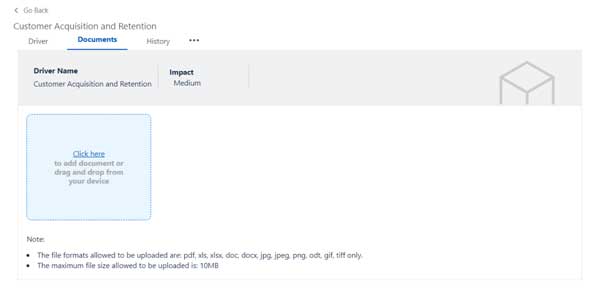
Documents
- For any driver, system provides an ability to upload multiple documents.
- The file formats allowed to be uploaded are: pdf, xls, xlsx, doc, docx, jpg, jpeg, png, odt, gif, tiff only.
- The maximum file size allowed to be uploaded is: 10MB
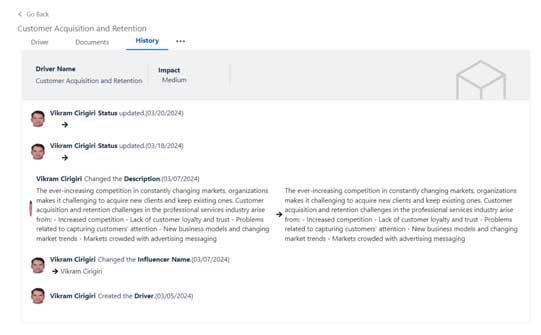
History
- An audit trail of all the actions performed on the current driver record is maintained in the History tab.
Edit Driver #
In the view driver screen, the user has an ability to edit the existing information of a driver by clicking on the Edit icon.
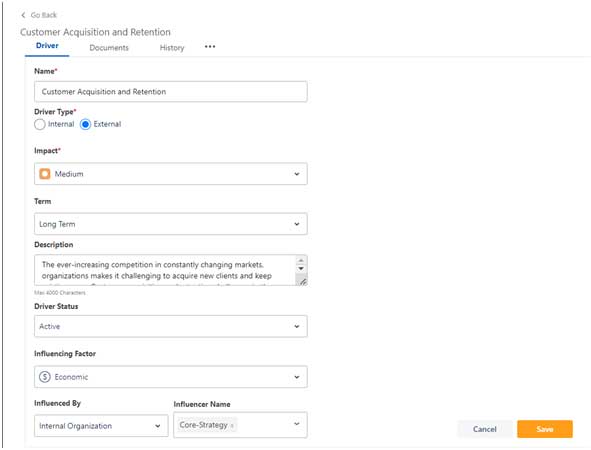
The user has the ability to change any of the above information.
- Driver Name: The name of the driver
- Description: The brief description provided by the user
- Driver Type: Driver types can be either Internal/ External influencing factor for the organization.
- Term: Identify the duration of impact the driver is likely going to have on the organization.
- Impact: Identify the impact the current driver has on the organization.
- Influencing Factors: This is based on the concept of PESTEL Analysis where an influencing factor can be any one of Political, Economic, Social, Technological, Legal or Environmental. The user needs to select any one of the influencing factors here.
- Status: The current status of the driver. A driver can be either in Active/ Disabled status.
- Influencer: The Influencer of the driver is someone who is the real influence behind the creation of the driver. It can be an internal/ external person. It can also be an internal/ external organization.
- Influenced By: This will be the name of the organization or person who has influenced the creation of the specific driver.
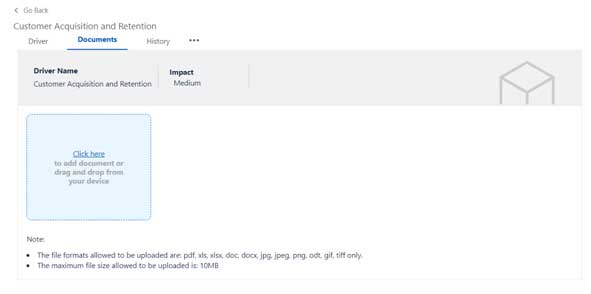
Documents
- For any driver, system provides an ability to upload multiple documents.
- The file formats allowed to be uploaded are: pdf, xls, xlsx, doc, docx, jpg, jpeg, png, odt, gif, tiff only.
- The maximum file size allowed to be uploaded is: 10MB
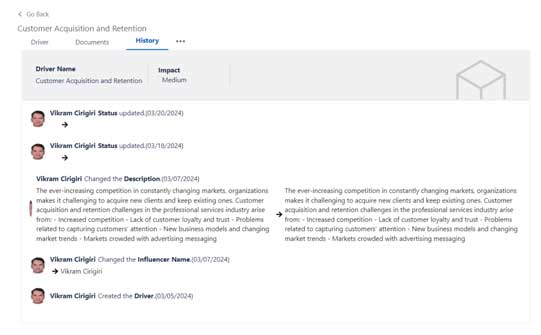
History
- An audit trail of all the actions performed on the current driver record is maintained in the History tab.


Leave a Reply