
A business capability is a particular ability or capacity that a business may possess or exchange to achieve a specific purpose or outcome.
Defining a business capability involves identifying and describing what needs to be done by the business in support of its overall mission.
Capability List #
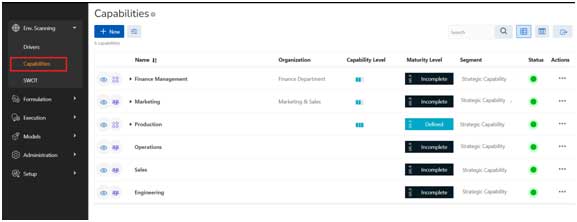
- To get the list of organizational capabilities, click on Env. Scanning à Capabilities
- All business capabilities within the organization are visible to users.
Common Components:
 This button allows user to create a new capability.
 Open Filter section for advanced filter capability
 User has an ability to export results in XLSX, CSV, PDF formats
 View the Capabilities List Page
 View the Capability Map graphical representation
 Search capabilities
Table Column
- Column 1: It has all the icons like Existing/ Desired and Capability Area
- Name: An hierarchical view of the capability name
- Organization: the organization where the capability exists
- Capability Level: Display the capability level
- Maturity Level: Display the maturity level of the capability.
- Segment: The top most segment will be Strategic Capability, Next child level will be an Operational Capability and level 3 onwards will be Enabling Capabilities.
- Status: Status Green indicates Active Capability. Red indicates a Disabled Capability.
- Action: Available actions against each individual record are:
- View: View the selected capability details
- Edit: Edit the selected capability
- Add Child: Add a child record to the selected capability
Filter
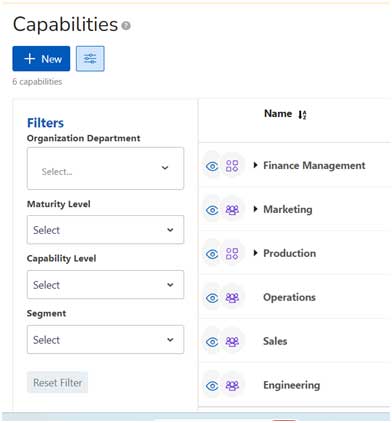
Filter options provided are:
- Department: All the departments within the organization sis shown in an hierarchical view.
- Maturity Level: Show only those records, as per the maturity level selected.
- Capability Level: Show only those records, as per the capability level selected
- Segment: Search based on Segment
- Reset Button: Clear all the filter applied to the application.
Capability Map #
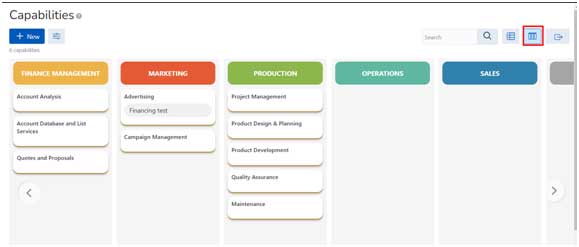
The Capability Map screen shows the organization capabilities in the Capability Map view. Upto 3 Levels are visible on any Capability Map screen.
Add Capability #

- Click on +New button to add a new capability
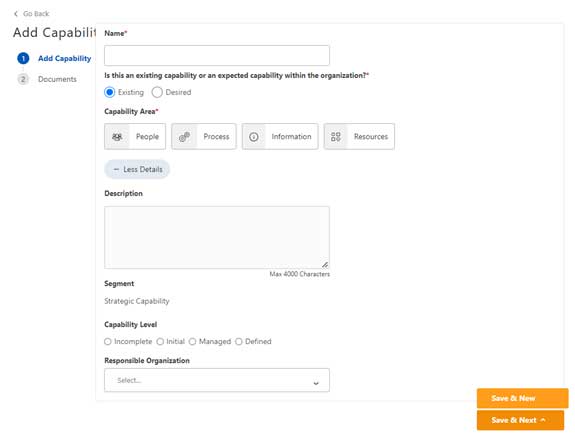
- Name (Mandatory): Name of the capability
- Is this an existing capability or an expected capability within the organization?: Select relevant option.
- Capability Area: There are four types of capability areas with its meaning. Select the appropriate capability area.
- People
- People represent individual actors, stakeholders, business units, or partners involved in delivering a business capability.
- Role-specific business capabilities should be reviewed as they may be just a component of another business capability.
- Process
- Range of business processes
- Information
- Information represents the business data, knowledge, and insight required or consumed by the business capability
- Resources
- Information technology systems and applications
- Physical assets, such as buildings, machinery, and vehicles
- Intangible assets, such as money and intellectual property
- Description: The description of the capability in upto 4000 characters.
- Segment: The top most segment will be Strategic Capability, Next child level will be an Operational Capability and level 3 onwards will be Enabling Capabilities.<Further definition of segment is described in the terminology section.>
- Capability Level: Capability levels apply to an organization’s performance and process improvement achievements in individual practice areas. Within practice areas, the practices are organized into practice groups labeled Level 0 to Level 3 which provide an evolutionary path to performance improvement. Each level builds on the previous levels by adding new functionality or rigor resulting in increased capability.
- Maturity Level: Maturity levels represent a staged path for an organization’s performance and process improvement efforts based on predefined sets of practice areas. Within each maturity level, the predefined set of PA’s also provide a path to performance improvement. Each maturity level builds on the previous maturity levels by adding new functionality or rigor.
- Responsible Organization: Select the organization which is responsible for the current capability.
- People
Buttons
- Save & Next: Save the current record and move to uploading a document for the same capability.
- Save & New: Save the current record and show a black screen to create new capability.
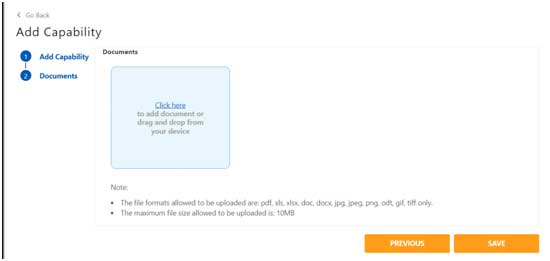
Documents
- For any capability, system provides an ability to upload multiple documents.
- The file formats allowed to be uploaded are: pdf, xls, xlsx, doc, docx, jpg, jpeg, png, odt, gif, tiff only.
- The maximum file size allowed to be uploaded is: 10MB
View Capability #
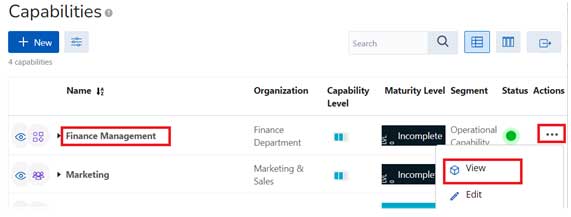
On Capabilities List Page, user can choose to click on the Capability Name or from Actions Menu, click on View to navigate to the Capability Detail Page.
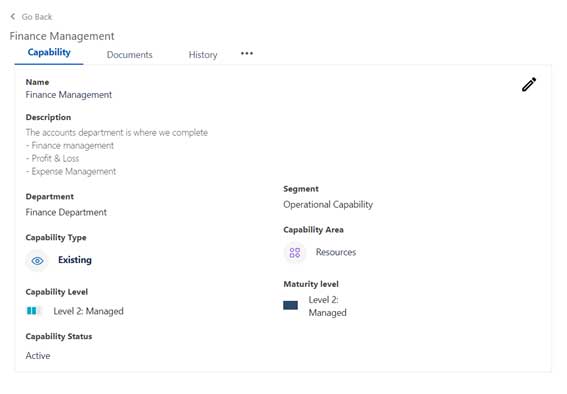
In the detail page, we have three tabs:
- Capability: Shows all key details about the capability.
- Documents: Shows all uploaded documents for the capability.
- History: Shows all the changes made in the capability from the initial creation.
- “…”: The Actions menu is available as a quick option for various actions available for the user.
- : Edit icon is available for users with Edit Permissions.
Capability Tab
The Capability tab shows all the key information about the capability.
- Name: The Name of the capability
- Description: Details of the capability
- Department: Shows the department this capability belongs to.
- Segment: The top most segment will be Strategic Capability, Next child level will be an Operational Capability and level 3 onwards will be Enabling Capabilities. <Further definition of segment is described in the terminology section.>
- Capability Area: There are four types of capability areas with its meaning. Select the appropriate capability area.
- People
- People represent individual actors, stakeholders, business units, or partners involved in delivering a business capability.
- Role-specific business capabilities should be reviewed as they may be just a component of another business capability.
- Process
- Range of business processes
- Information
- Information represents the business data, knowledge, and insight required or consumed by the business capability
- Resources
- Information technology systems and applications
- Physical assets, such as buildings, machinery, and vehicles
- Intangible assets, such as money and intellectual property
- Capability Level: Capability levels apply to an organization’s performance and process improvement achievements in individual practice areas. Within practice areas, the practices are organized into practice groups labelled Level 0 to Level 3 which provide an evolutionary path to performance improvement. Each level builds on the previous levels by adding new functionality or rigor resulting in increased capability.
- Maturity Level: Maturity levels represent a staged path for an organization’s performance and process improvement efforts based on predefined sets of practice areas. Within each maturity level, the predefined set of PA’s also provide a path to performance improvement. Each maturity level builds on the previous maturity levels by adding new functionality or rigor.
- Capability Status: There are two status of a capability: Active/ Disabled.
- People
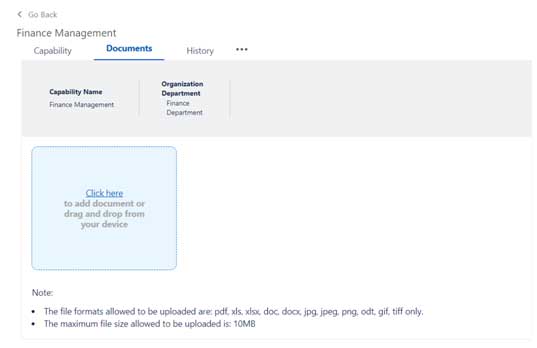
Documents
- For any capability, system provides an ability to upload multiple documents.
- The file formats allowed to be uploaded are: pdf, xls, xlsx, doc, docx, jpg, jpeg, png, odt, gif, tiff only.
- The maximum file size allowed to be uploaded is: 10MB


Leave a Reply